Hyzermetrics Head2Head

The disc golf careers of legends Ken Climo and Paul McBeth overlapped for over a decade. In the mid-2010s, As Ken Climo began playing fewer tournaments, and even fewer in the MPO division, McBeth’s domination began. Although we won’t ever get to see these two athletes compete head-to-head in their primes, they did compete against one another at 42 tournaments, encompassing 157 rounds from 2006 to 2017. That’s a lot of disc golf tournaments featuring two of the best the sport has ever seen! With such a large sample size, we would usually expect one of the two players to emerge as the clear victor in their head-to-head matchups. Somehow, that didn’t happen with Climo and McBeth. The difference in their total throw counts across these events: a mere thirteen strokes!
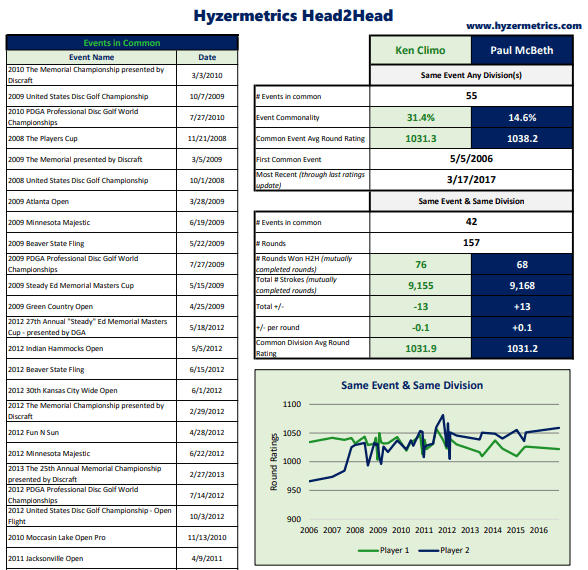
For the first time ever, disc golfers now have access to data that gives cool head-to-head stats like the one above. Introducing the Hyzermetrics Head2Head spreadsheet! It gives a disc golfers and fans the opportunity to compare head-to-head stats of any two current PDGA members, all you need are PDGA numbers! The Hyzermetrics Head2Head spreadsheet allows disc golfers to:
·         Quickly get cool stats from head-to-head matchups between disc golf’s best – Pick your favorite disc golfers and give it a shot!
·         Figure out which tournaments they’ve played with specific people – how many times have you asked yourself “where have I played with that person before…?” The Hyzermetrics will list every tournament you’ve played with the other person and how you’ve done in those tournaments
·         Earn serious bragging rights with friends – regularly remind your buddy that you’ve shot better in 70% of the events you’ve played together… or if that percentage doesn’t work out in your favor maybe keep that on the DL.

In the Climo vs Mcbeth example from earlier, Hyzermetrics Head2Head shows how the matchups between the champs changed over the years. It makes sense that 54 year-old Climo dominated the first three years of the battle (2006-2009) as 32 year-old McBeth came onto the scene. The next three years saw a back-and-forth struggle between the two powerhouses. As McBeth established dominance in the disc golf world in 2012 he slowly started to make up the ground he’d lost in the early years of the matchup.

The decade-long head-to-head battle between Ken Climo and Paul McBeth likely came to an end in 2017, with Climo playing few PDGA tournaments, and even fewer in the MPO division. While I am not prepared to weigh in on which disc golfer is the greatest of all-time, Hyzermetrics Head2Head can tell us how these incredible athletes fared when they competed against one-another.

NOTE: When you first open Hyzermetrics Head2Head you will need to enable External Data connections. You also may get a popup about Privacy Levels. If you do, check the “Ignore Privacy Levels” box and in the dropdowns on the right-hand side set both options to Public

The Hyzermetrics Eventfinder: the New Way to find your Next PDGA Tournament

As hinted in my last post, the ability to systematically match PDGA Events with their corresponding Event Numbers has a number of implications that can help disc golfers make sense of the ever-growing amount of data available on the web. The Hyzermetrics Eventfinder is the first of many applications of the PDGA Event Number Database, and I couldn’t be more excited to share!

Fortunately for disc golfers, the PDGA website has always had a pretty good search feature that has more or less stood the test of time. But the Hyzermetrics Eventfinder provides users with a handful of search datapoints that the PDGA Website does not:

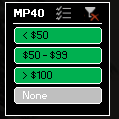
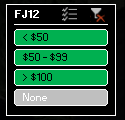
1. Search by Division – The Hyzermetrics Eventfinder can help you quickly weed out events that don’t offer your division(s) of interest. For example, suppose you play MP40, but would like to find a tournament that you and your daughter (FJ12) can both play. Many tournaments do not offer both of these divisions, and until now there has not been a way to easily identify those that do. The Eventfinder will help. Filter on each of the divisions of interest (tip: hold CTRL to select multiple buttons within a single slicer box) and you will be left only with the tournaments that offer MP40 and FJ12.

2. Search by Entry Fee – Money is tight these days, but the Hyzermetrics Eventfinder can help disc golfers find events that fit their budget. Don’t want to break the bank to play a sanctioned event? Pick a <$50 filter in your division of choice to weed out the events that are out of your budget.

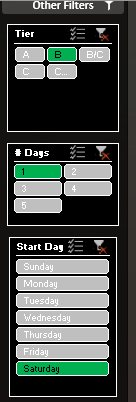
3. Search by Number of Days and Starting Day of Week – Weekend warriors know that time can be fleeting. The Hyzermetrics Eventfinder can help these golfers find tournaments that fit into their busy schedules. If you’re looking for a B-Tier but can only play on Saturdays, set the below filters and you will see only the events that meet these criteria!

A few notes about the Hyzermetrics Eventfinder:

  1. You can update the data yourself! That’s right, once you download the Hyzermetrics Eventfinder, you do not need to re-download it to get the latest and greatest event listing. Simply click CTRL+ALT+F5 to refresh the tournament list.
  2. It only contains events that appear on the PDGA calendar
  3. It only contains events that take registration through discgolfscene.com
  4. It does NOT contain any X-tier or League Sanctioned events

This new tool, while useful, is just the tip of the iceberg of what we can do when we can match PDGA Events with their Event Numbers.

The Missing Link: PDGA Event Number Database

PDGA Event Numbers are rarely of importance to most disc golfers. But for data enthusiasts, they are a piece of the puzzle that can link data from a disc golfer’s PDGA page to data from the events they play. Unfortunately, PDGA Event Number listings have not historically been available. Until now. Hyzermetrics is excited to introduce the PDGA Event Number Database! This Database will be refreshed on this post on a monthly basis. No crazy macros, no complicated analysis, just a simple Excel spreadsheet for you to use in your own data exploration.

Putting Practice: Hypothesis Testing

Hello Hyzermetricians, for tonight’s post I will be shining an insanely bright light on the latest video from my Instagram Live Garage Putting Series.

Alright, let’s set the stage. If you haven’t seen my live putting sessions before, most of them consist of fifty putts. Sometimes I bring in obstacles or I move the basket up onto a stair to mix things up, but for the purposes of last night’s video, I attempted 50 straightforward 19-foot putts.

I’d love to think that I should make 100% of these 19-footers, but sadly that is not (yet) the case. Instead, I hypothesized that my true putting percentage from this range was 95%. The rest of this post explains how I used my putting session last night to create a test of this hypothesis, and how you can perform a similar test too!

Suppose for a second that my hypothesis is correct, I am indeed a 95% putter from 19 ft. That doesn’t mean that I will always make 95% of my putts whenever I shoot a video. In fact, if I only attempt 50 putts at a time, it’s impossible to make exactly 95% of my putts. In some of my putting videos I’ll make more than 95% of my putts, in others I’ll make less. Given this variability, and the fact that I don’t actually know my true putting percentage, how can I ever determine if my hypothesis is accurate? Let’s find out. Roll the video!

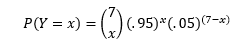
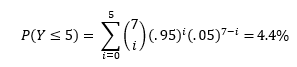
For starters, let’s look at the first seven putts from the video, of which I made five. It doesn’t take a math wizard to know that if I was truly a 95% putter like I hypothesized, 5 out of 7 (71%) is not very good. In fact, it’s probably very rare for a 95% putter to ever go less than 6 for 7! How rare? The probability of a 95% putter making Y=x putts in 7 attempts can be expressed by the below equation:

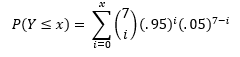
And the probability of a 95% putter making Y≤x putts in 7 attempts can be expressed by the below:

 (Note, for the purposes of this exercise, I am assuming that each putt is an independent trial whose result is unaffected by any other putt in the video). If you’re wondering where these equations came from, in this exercise we are treating Y as a binomial random variable.

So, if I was truly a 95% putter, then the probability of me making less than or equal to 5 putts in 7 attempts is:


Remember, I want to use my putting video to test my hypothesis that I am indeed a 95% putter from 19 ft. Suppose that I create a testing procedure that says “If the observed outcome has a less than 5% chance of occurring, then reject the hypothesis.” Under this testing procedure, I would reject the hypothesis if 5 or less putts were made, but would accept the hypothesis if 6 or more were made. Thus, under this test, based on the first seven putts of my video, I’d reject the 95% hypothesis. How sad.

The testing procedure mentioned above has a major downfall. It had an extremely high probability of erroneously accepting the hypothesis, even if it was untrue. Suppose that my true putting percentage was 85%. Even under this lower putting percentage, it’s completely feasible that I could have made 6 or even 7 of my first 7 putts, causing us to NOT reject the hypothesis of 95%. Under the test described above, the probability of accepting the 95% hypothesis for an 85% putter is:
That means that even a putter much worse than 95% could easily trick the test into accepting the 95% hypothesis. Thus, the test is not very accurate with only seven putts. We can improve upon it with more trials! Let’s look into what happened for the rest of the video.

Suppose we follow the same testing procedure as we did before: “If the observed outcome has a less than 5% chance of occurring under when the existing hypothesis is true, then we reject said hypothesis.” However this time, instead of 7 putts as my sample size, I now have 50. This procedure would dictate that we reject the hypothesis for 44 or fewer made putts. Probability of observing this for a 95% putter is:
In the video, I made 46 of the 50 attempts, so under this test, we would NOT reject the 95% hypothesis. Hooray! But remember the downfall of our earlier test… that test had a high probability of accepting the 95% hypothesis for significantly worse putters than 95%. To contrast, let’s see how the new testing procedure does at weeding out 85% putters:
This result, compared to the 71.7% result from the initial testing procedure shows that a sample of 50 putts is far more accurate than a sample of just 7.

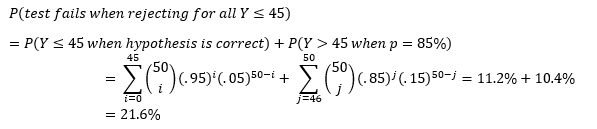
Even though the new test procedure based on 50 putts is an improvement from our earlier procedure based on 7 putts, it could be even better! Note, the probability that our test fails is equal to the sum of the two percentages in the equation above.

That’s a fairly high probability that our test will fail! If we choose to change our testing procedure so that we only reject when Y≤45, then we can improve the accuracy of the test.

Thus, a testing procedure that rejects the hypothesis for all Y≤45 has a lower probability of failure than one that rejects for all Y≤44. In fact, the Y≤45 test is the most accurate testing procedure for testing a 95% hypothesis for a sample size of 50 putts.

There’s a lot to unpack in all of the equations and commentary above. And any time the summation operator appears, especially for large numbers, the math can become super tedious. That’s why I created the Putting Hypothesis Tester for you to use in your putting practice.

To use the tester:

  1. Download the file
    1. You may need to click Enable Content
  2. Click the Develop a new test button
  3. Follow the prompts
  4. View the testing parameters on the Summary Sheet
  5. Go putt to test your hypothesis!

Introducing the Disc Golf Player Summary

It’s the start of Winter and for this Chicago Disc Golfer, the change of season has had a lot of meaningful implications:

  1. It’s dark outside when I leave work.
  2. Walking Gordon is not nearly as much fun as it was a couple months ago.
  3. Days that allow for enjoyable disc golf are few and far between.

Since I’m not able to practice nearly as much as I’d like to, my mind has had a little too much time to wander… a scary thought, I know.

With so much time on my hands, I began to reflect on the 2021 disc golf season. At the onset of this year, I made a conscious effort to rid myself of the “play-it-safe” mentality. Sometimes, this more aggressive approach worked out in my favor, other times not so much. It was fairly easy to track how my PDGA rating changed over the course of the year, but I began asking myself questions that weren’t as easy to find the answers to. Does an aggressive approach lead to greater round rating volatility? Conversely, does a conservative approach lead to more consistent round ratings? In what years were my top events of all time?

In general, I am a fan of the PDGA’s rating system (stay tuned for a blog-post explaining why), but a player’s rating at a given point in time fails to convey two vital pieces of information:

  1. It is not directional or predictive
  2. It is not indicative of volatility

It’s time consuming and tedious to go to a player’s PDGA page, get information on all the rounds and events they’ve played, then summarize the information in a way that allows for prediction. That’s why I developed the Disc Golf Player Summary, which instantly tells a deeper story of a disc golfer and their rating.

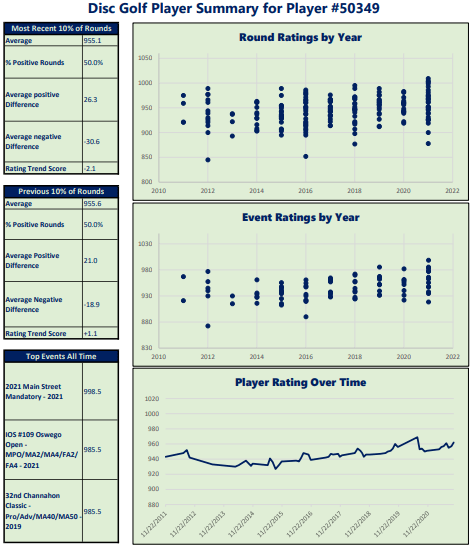
The Disc Golf Player Summary highlights trends from PDGA sanctioned tournament round performance (sanctioned leagues are not included). Specifically, it looks at how a player performs in a given round relative to their Player Rating at the time. When a player’s round rating is higher than their player rating at the time of the round, it is referred to as a positive round, and the difference between the round rating and the player’s rating at the time is called the positive round difference. For example, when a 950 rated player shoots a 980 rated round, the round is a positive round with a positive round difference of 30. Similarly, rounds below a player’s rating are considered negative rounds, with the difference between the player rating and round rating referred to as negative round difference. When a 950 player shoots a 920 rated round, this round is considered a negative round with negative round difference of -30. Here’s the information you’ll get out of the Player Summary:

What is the Probability of a Positive Round?

Since player rating is regularly changing, it is insufficient to use traditional traditional statistics like mean and standard deviation to predict player performance. Players who are regularly outperforming their player rating might be more likely to have success than their player rating would otherwise indicate. The Summary compares positive round likelihood from the most recent 10% of rounds to that of their previous 10% of rounds

What is Average Positive Round Difference? How about Average Negative Round Difference?

This number tells us how volatile the player is. When they shoot well, are they beating their player rating by a significant margin? Or are they always within a few points of their player rating? Conversely when they shoot poorly, are they completely falling apart, or are they salvaging their negative rounds to avoid plummeting down the leaderboard? Again, the Summary sheet compares these metrics from a player’s most recent 10% of rounds to their prior 10% of rounds.

Do the positive rounds outweigh the negative rounds?

This metric, coined the Rating Trend Score, can be thought of as expected points a player will shoot below or above their round rating. It is defined as:

% Positive Rounds * Average Positive Round Difference + % Negative Rounds * Average Negative Round Difference

Which events are the player’s best and when did they happen?

This fairly innocuous question is actually a kind of a beast to answer definitively on the PDGA player page, though its answer can provide significant insight into the direction a player is headed. If their top 3 events are all recent, then there’s a good chance they are on their way up the leaderboard at their local tournaments.

Here’s how the Player Summary works:

  1. Download the Excel document
    1. Upon opening click Enable Content if prompted
  2. Click the Generate the New Report button
  3. Enter in your PDGA # (or your friend’s, or Paul McBeth’s, whoever!)
  4. Enjoy the Player Summary…
  5. Repeat steps 2 through 4 indefinitely!